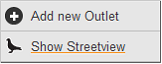
You can get an accurate StreetView of any location (as long as StreetView is supported by Google in the specific country) by right clicking the mouse anywhere on the map (but not on an outlet). This brings up a context menu. Select ‘Show StreetView’. A StreetView of the specific location will appear in a slide-out panel to the right hand-side of the map.
 Network Toolkit User Guide