Step 4 - Fix the Starting Point
Step 4 - Fix the Starting Point
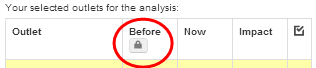
In the 'Before' column, you will notice a small padlock (red circle). By clicking on this, you will fix the current scenario and calculations into the 'Before' column. This action will allow you to compare any network changes to the exact network configuration tht you had on the map when you pressed the padlock. If you do not fix this point, the calculations for the original network configuration will be lost as you make changes to your network. By fixing the starting point, you will notice that the calculations in the 'Now' column move into the 'Before' column and will stay there unless you 'unfix' the padlock.
 Network Toolkit User Guide