Step 3 - Select Outlets to Include in the Analysis
Step 3 - Select Outlets to Include in the Analysis
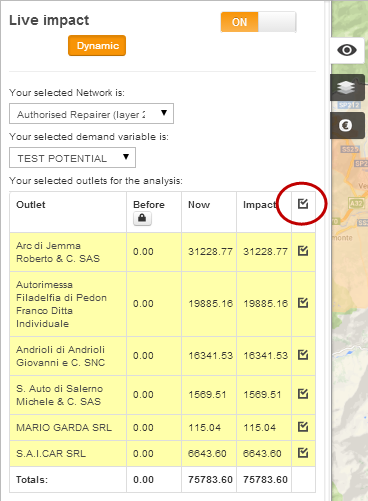
In Step 3, you will be asked to select specific outlets / dealers (by clicking on them on the map) to go into the LiveImpact comparison table. To select more than one outlet / dealer, keep the ' Shift' key pressed down and select the outlets you wish on the map. You will see the outlets appear in the table as you select them (see below), along with the first calculations. By clicking on the checkbox in the top right of the table (red circle), you will fix all of these selected outlets in the table. You can individually remove any outlets by clicking the specific check box for that outlet.
 Network Toolkit User Guide