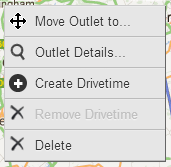
There are several ways of moving an outlet from one location to another. You can simply select a dealer and drag them to another location on the map. Alternatively, you can right click on an outlet and select the Move Outlet to... option.
This allows you to be more specific by entering a city, town, locality, postcode or street address to move to. The search results will have a green arrow that you can click on to automatically move the outlet to that specific location. When you move an outlet, Network Toolkit will automatically change the address details but will keep the outlet name and code.
 Network Toolkit User Guide