Dynamic Update of Drivetime Layers
Once you have created a drivetime from an outlet, you can select the dynamic or interactive update option. This allows you to update the drivetime automatically, simply by moving the outlet location on the map. Once you drag and drop the outlet, the drivetime will automatically recalculate from the new location.
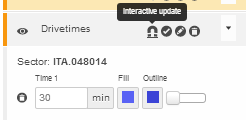
To switch this feature on, you need to switch on the 'interactive update' icon for the drivetime map layer (see below). Please note that this will only work for any drivetime created from an outlet (will not work for a drivetime created from a map location)
To switch off the dynamic or interactive update, simply click the 'interactive update' icon again.
 Network Toolkit User Guide